
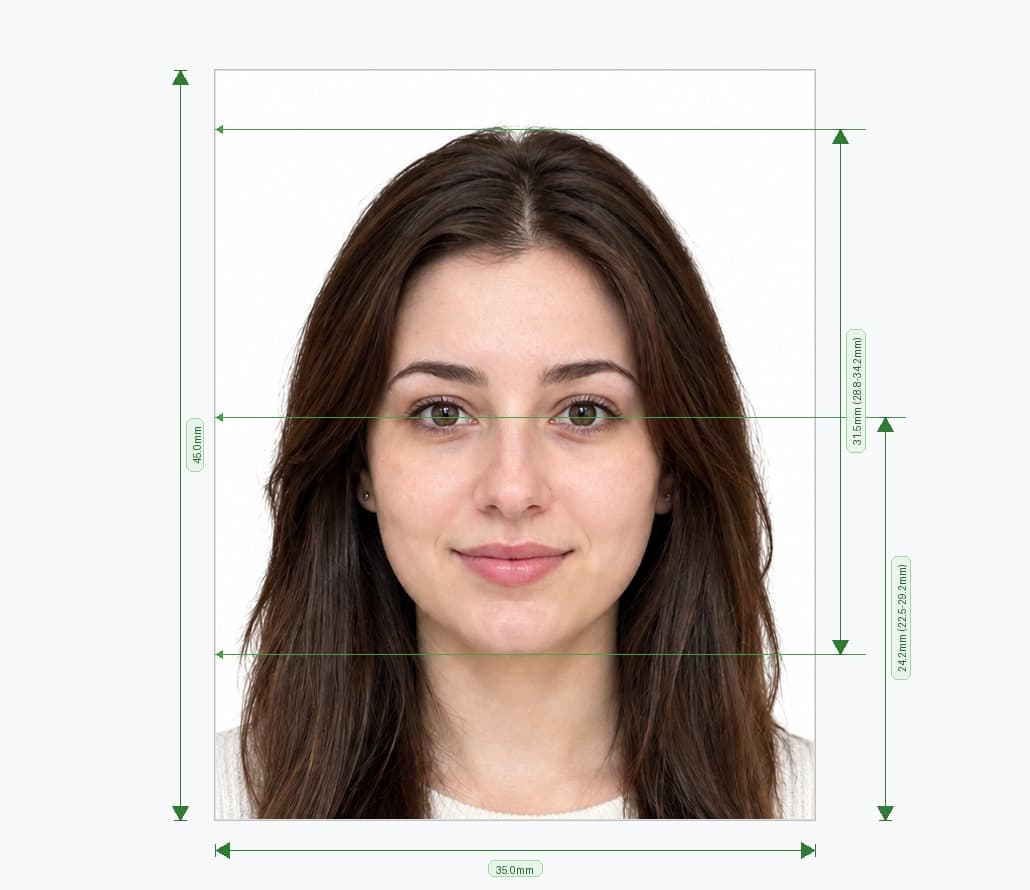
Order Passport Photos Online in Minutes
You do not need to visit a studio, queue at a booth or take time off work to get passport photos. Take a picture on your phone, upload it to our online passport photo studio, and we size it, clean up the background and check your head against the official range. Then download the file, or order prints.
Order for yourself, your partner or your children. Each photo takes about two minutes to prepare.
How to Order a Passport Photo Online in 5 Steps
- Choose your country and document. Pick the passport format you need, because sizes differ around the world.
- Upload your picture. Select a clear, front-facing photo from your phone or computer.
- Review the automatic checks. The tool crops your photo, replaces the background and tests your head size.
- Retake or adjust if needed. Try another picture until every check passes.
- Download or order prints. Save a digital file for online forms, or order printed photos for paper applications.
Online Studio vs High-Street Photo Booth
An online passport photo order gives you more control than a booth or shop. Compare the options:
| Online passport photo studio | Photo booth or high-street shop | |
|---|---|---|
| Location | At home, on any device | You travel to a branch |
| Retakes | As many as you need | Limited, and often extra cost |
| Background | Replaced and checked for you | Set by the booth or the operator |
| Size checks | Automatic, per country | Depends on the operator |
| Digital file | Yes, instantly | Sometimes, at extra cost |
| Prints | Optional | Included |
What You Get When You Order Passport Photos Online
- Country-specific sizing: The tool offers the exact format your country requires.
- Background replacement: It swaps your wall or room for a plain background.
- Head-size check: It measures your head against the official range.
- Photo converter: Turn an existing picture into a passport photo without a retake.
- Phone-friendly design: Upload straight from your camera roll.
- Digital file: Download a JPEG for online applications.
- Print options: Order printed photos, or print a sheet yourself.
Passport Photo Sizes by Country
Passport photo sizes vary, so choose the right format when you order. Here are common sizes:
| Country or region | Photo size | Notes |
|---|---|---|
| United Kingdom | 35 × 45 mm | Cream or light grey background |
| United States | 2 × 2 in (51 × 51 mm) | Square, white or off-white background |
| European Union (Schengen) | 35 × 45 mm | Plain, light background |
| India | 35 × 45 mm (630 × 810 px online) | Some missions abroad set their own rules |
| Canada | 50 × 70 mm | Larger portrait format |
| Australia | 35 × 45 mm | Plain, light background |
Need a specific format? See our dedicated pages for the UK passport photo, UK passport renewal photo, Indian passport photo and US visa and passport photo.
Passport Photo Requirements to Check Before You Order
Each country sets its own rules, but most follow the same ICAO principles. Check these points before you upload your picture.
Pose and Expression
- Face the camera. Look straight at the lens with your head level.
- Keep a neutral expression. Close your mouth and keep your eyes open.
- Show your full face. Keep hair away from your eyes, and keep your face uncovered from chin to forehead.
Background and Lighting
- Use a plain background. Most countries ask for white, cream or light grey.
- Avoid shadows. Even lighting on your face and the wall gives a cleaner cut-out.
- Keep the frame clear. Other people, objects and patterns cause rejections.
Glasses, Headwear and Editing
- Remove your glasses. Many countries no longer accept them, except for documented medical reasons.
- Wear headwear only for religious or medical reasons. Show your full face.
- Do not retouch the photo. Filters, smoothing and heavy editing lead to rejection.
How to Take a Good Picture at Home
A clear picture gives the cleanest result, so take a few minutes to set up.
- Ask someone to help. Selfies distort your face, so have a friend hold the camera at eye level.
- Face a window. Soft daylight removes shadows from your face.
- Stand about one metre from the camera. Keep the lens level with your eyes.
- Use a plain wall. A simple backdrop gives a sharper background cut-out.
- Leave space around your head. The tool needs room to crop correctly.
- Look straight ahead. Relax your face and keep your head level.
Digital Photo or Printed Photos?
Choose the output that fits your application.
| Digital photo | Printed photos | |
|---|---|---|
| Best for | Online applications and portals | Paper forms and in-person visits |
| Output | JPEG at the required pixel size | Prints at the exact millimetre size |
| Checking | Portals often check it automatically | You check it yourself |
| Delivery | Instant download | Posted or printed by you |
If you print at home or at a shop, choose 100% scale with no fit-to-page setting. Cut each photo to the exact size, or ask for your country's passport format.
Passport Photos Delivered to Your Door
If your application needs printed photos, order them online and have them delivered, so you skip the trip to a shop. Check the delivery time and cost at checkout, and allow extra days if your deadline is tight.
Looking for Passport Photos Near Me?
You can order online from anywhere, so you do not need to search for a studio. If you would rather have someone else take the picture, many pharmacies, supermarkets and Post Office branches offer passport photo services, and prices vary. Ask about the size and background before you pay.
For most people, an online order costs less and saves time. Take the picture at home, and check it against the official rules before you submit.
Passport Photos for Children and Babies
Children need the same size and background, but many countries relax some rules for young ones. Babies often do not need to look at the camera, and no one else may appear in the photo. Check your country's guidance for children before you apply.
Order Your Passport Photos Online Now
Upload your picture, choose your country, and get correctly sized passport photos in minutes. Download your file or order prints, with no studio visit needed.
Frequently Asked Questions
Everything you need to know about official Order Passport Photos Online requirements and specifications.
Can I order passport photos online?
Yes. Upload your picture, choose your country, and we prepare the photo. Then download the file or order prints.
How much does it cost to order a passport photo online?
A digital photo costs 7.99. Check the price of printed photos at checkout.
Are there free passport photos near me?
Free options are rare, and the quality varies. You can upload your picture and preview the result before you pay, so you see the outcome first. Confirm the current terms in the editor.
Can I get passport photos delivered?
Yes, if you order prints. Choose the print option at checkout, and check the delivery time before you pay.
Do I need to visit an online passport photo studio?
No. The studio is online, so you upload a picture from your phone or computer and never visit in person.
Can I use a selfie?
Yes, if it is sharp, front-facing and well lit. Use the rear camera, and have someone else take the picture if you can.
Will my passport photo definitely be accepted?
No service can promise that. The issuing authority makes the final decision, but our checks help you avoid the most common mistakes.
Ready to create your verified Order Passport Photos Online?
Upload your photo in seconds and receive guaranteed HMPO / ICAO compliant digital photos and printable sheets.
Upload Photo & Create Now