
Create a Passport Picture Online
The UK passport photo maker for new applications and renewals
Upload one photo and get a ready-to-submit digital photo for your passport, visa, or passport renewal. We crop, resize, and check your photo against official government rules for the UK, US, Schengen Area, and 50+ other countries in under 10 seconds.
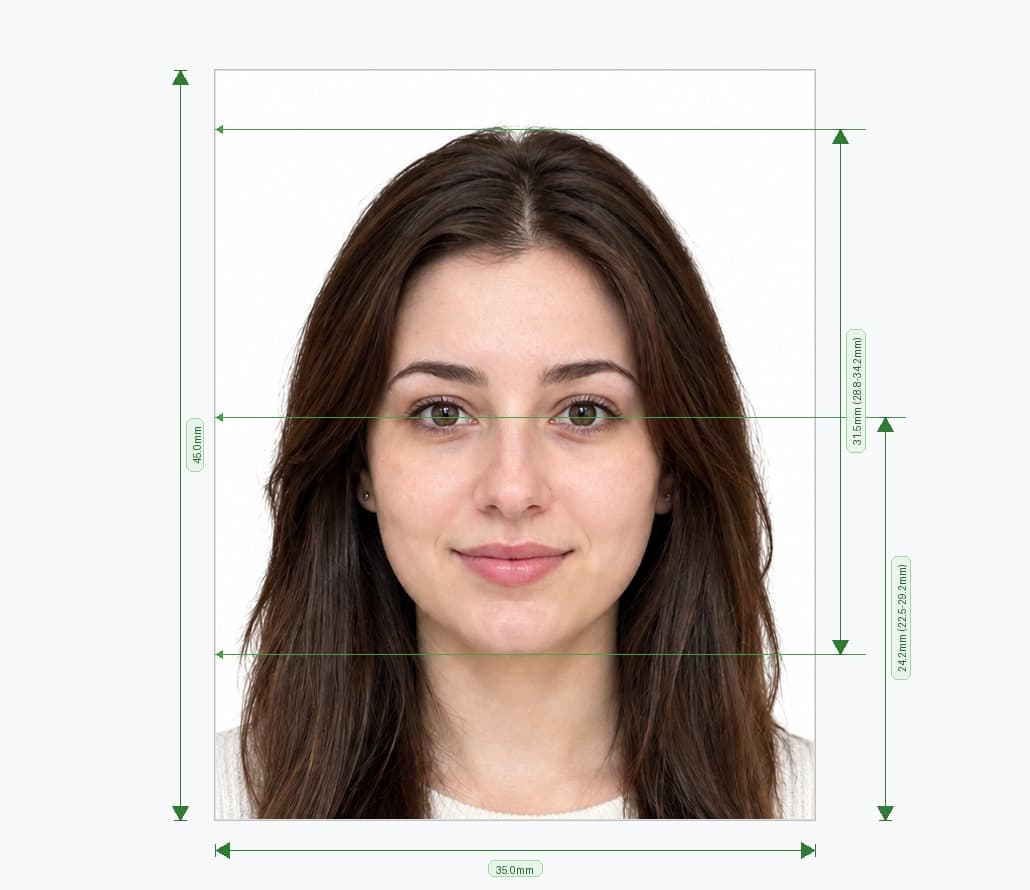
How to Create a Digital Photo for Passport Online
Three steps take you from a regular photo to an accepted biometric passport picture for the UK and 50+ countries.
Select Your Country
Pick the UK, US, Australia, Canada, Schengen Area, India, or one of 50+ countries. We load the official biometric size for that passport, visa, or ID photo automatically.
Upload and Auto-Crop
Upload any digital photo for your passport application. Our passport picture cropping tool centres your face, straightens your head position, and resizes the image to the exact pixel dimensions required.
Preview and Download
In under 10 seconds you get a compliant digital photo plus a print-ready 6×4″ sheet, ready to submit online or print at home.
Everything You Need From a UK Passport Photo Maker
Create, crop, verify, and print official biometric passport photos from any device, for a first application or a renewal.
50+ Global Passport Formats
Create a passport picture online for the UK (600×750), US (600×600), Australia (413×531), Schengen Area (630×810), and dozens more official formats.
Passport Picture Cropping Tool
Our built-in cropping tool detects your face and eye line, then aligns and trims your photo to match strict head-size and centring rules automatically.
Biometric AI Verification
Every upload is checked for head height, eye position, background colour, and lighting, so your digital photo for passport applications is accepted the first time.
Built for Passport Renewal
Renewing a passport or visa? Generate a fresh digital photo for passport renewal that meets the same rules as a first-time application, without a studio visit.
Print Passport Photo Online
Download a high-resolution file and print your passport photo online at home, or take the ready-made 6×4″ sheet to any pharmacy or photo kiosk.
Instant Download & Complete Privacy
No subscriptions, instant high-resolution download, and no watermark. Create compliant photos for the whole family safely and securely.
Photo Rules You Can Verify, Not Just Trust
We built PixPassport with applicants and immigration document specialists, and we keep every country profile current.
Built From Real Applications
We tested PixPassport against thousands of real UK passport, US visa, and Schengen applications to fine-tune head size, spacing, and background checks that actually get accepted.
Rules Sourced From Official Guidance
Every country profile is built directly from government passport office and visa authority specifications, and we review these standards each time an issuing authority updates its rules.
Independently Verified Compliance
Each photo runs through automated biometric checks before download, so you can see exactly why a photo passes or fails instead of guessing.
Your Photo Stays Private
Photos are processed for your session only and are never sold, shared, or used to train other tools. You control the download, start to finish.
Rules & Guidance for Digital Passport Photos
Official government standards for online passport applications, device photography, and child photos.
Digital photos
You need a digital photo to apply for a passport online.
- You must get a new photo when you get a new passport, even if your appearance has not changed.
- Your photo must have been taken in the last month.
- Your application will be delayed if your photos do not meet the rules.
Rules for digital photos
The quality of your digital photo
Your photo must be:
- clear and in focus
- in colour
- unaltered by computer software
- at least 600 pixels wide and 750 pixels tall
- at least 50KB and no more than 10MB
What your digital photo must show
The digital photo must:
- contain no other objects or people
- be taken against a plain light-coloured background
- be in clear contrast to the background
- not have ‘red eye’
If you’re using a photo taken on your own device, include your head, shoulders and upper body. Do not crop your photo - it will be done for you.
In your photo you must:
- be facing forwards and looking straight at the camera
- have a plain expression and your mouth closed
- have your eyes open and visible
- not have hair in front of your eyes
- not have a head covering (unless it’s for religious or medical reasons)
- not have anything covering your face
- not have any shadows on your face or behind you
Photos of babies and children
- Children must be on their own in the picture. Babies must not be holding toys or using dummies.
- Children under 6 do not have to be looking directly at the camera or have a plain expression.
- Children under one do not have to have their eyes open. You can support their head with your hand, but your hand must not be visible in the photo.
- Children under one should lie on a plain light-coloured sheet. Take the photo from above.
Passport Photo Maker Package
One-off payment for your complete compliant digital photo and printable sheet.
Includes ready-to-submit digital photo and 6×4″ printable sheet
- Official biometric dimensions for 50+ countries
- Automatic passport picture cropping and resizing
- Smart in-browser compression to ≤ 3 MB
- High-resolution single digital passport photo
- Standard 6×4″ (10×15 cm) multi-photo print sheet
- Instant download with no registration or subscriptions needed
Popular Passport & Visa Photo Formats
Explore dedicated specifications and automated photo makers for top destinations.
UK Passport Photo
Official HMPO biometric specification for British passport renewal and first applications.
US Visa & Passport
Department of State compliant square photo for DS-160 visa applications and US passports.
Schengen Visa Photo
Biometric standard for France, Germany, Italy, Spain, and all 29 European member states.
Baby Passport Photo
Specialized infant & toddler guidance with relaxed head positioning and automatic background cleanup.
Indian Passport & OCI
VFS Global & High Commission compliant dimensions for Indian passport renewal and OCI cards.
UK Driving Licence
Driver and Vehicle Licensing Agency compliant photo for provisional and photocard renewal.
Frequently Asked Questions
Common questions about country rules, renewals, cropping, and printing.