
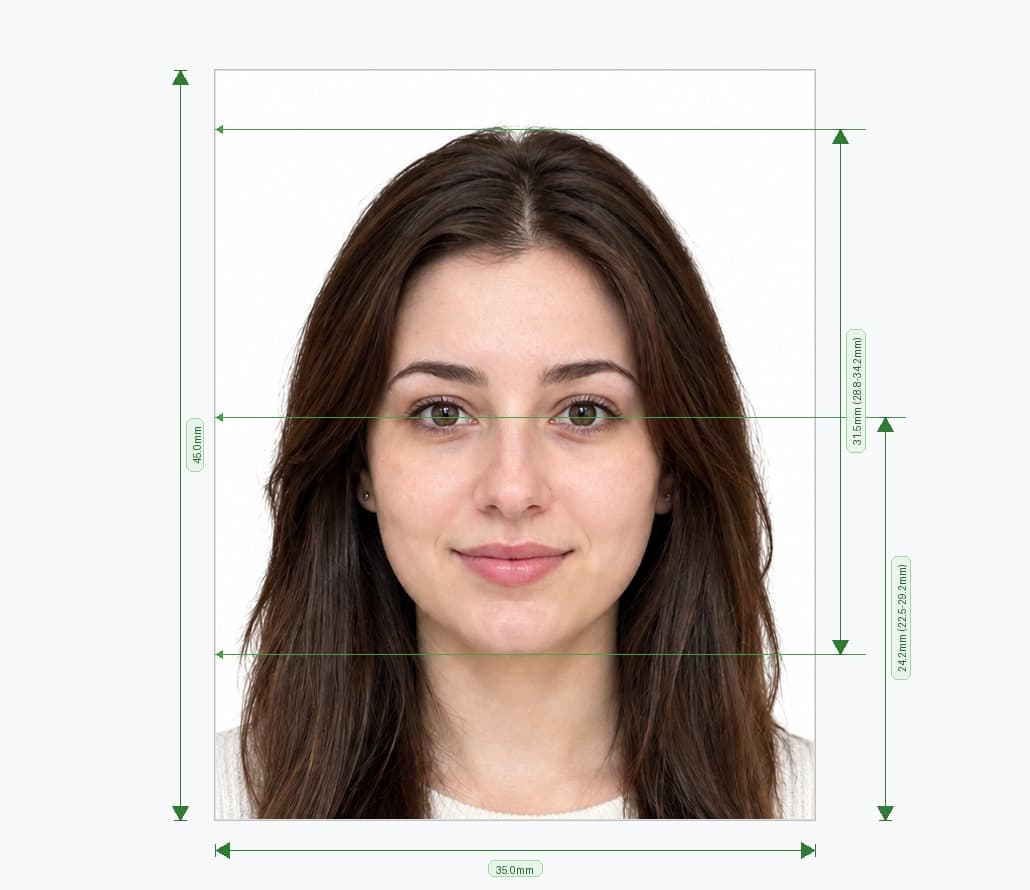
Create an ICAO Compliant Indian Passport Size Photo Online
You do not need a studio to get an ICAO compliant Indian passport size photo. Upload a picture from your phone, and our online Indian passport photo maker crops it to 35×45 mm, replaces the background with white and sizes your head to the required range.
Use this Indian passport size photo editor for a new passport, a renewal or a re-issue. You can convert an image to Indian passport size (a 630×810 px JPEG) for online upload, or print it at home or at a local shop.
How to Convert Your Image to Indian Passport Size (4 Steps)
- Upload your picture. Choose a clear, front-facing photo from your phone or computer.
- Let the tool crop and resize it. The editor centres your face and converts the image to 35×45 mm (630×810 px).
- Check the result. The tool removes the background and shows whether your head size fits the guidelines.
- Download your photo. Save a print-ready file, or use the JPEG for your online application.
The whole process takes about two minutes, and you can retake the photo as often as you need.
Indian Passport Size Photo: 35×45 mm
India follows the international ICAO standard for passport photos. Applicants use the same rectangular 35×45 mm format for new passports, renewals and re-issues. The old 2×2 inch (51×51 mm) square photo does not fit the standard Passport Seva rules, so a US-style square photo can fail at the upload stage.
Here is how the sizes compare across Indian documents:
| Document | Photo size | Format |
|---|---|---|
| Indian passport (new, renewal, re-issue) | 35×45 mm (630×810 px) | Portrait rectangle, white background |
| OCI card | 51×51 mm (2×2 in) | Square, uploaded online |
| Indian visa and e-Visa | 51×51 mm (2×2 in) | Square |
Applying from abroad? Some Indian embassies, consulates and outsourced centres (VFS Global, BLS International) may set their own photo requirements. Check your local mission's checklist before you print.
Photo for Indian eVisa: Which Size Do You Need?
Foreign travellers applying for an Indian eVisa use a different format from Indian passport holders. The eVisa and OCI portals ask for a square photo, so the 35×45 mm passport format on this page is not the one to use.
Use our Passport Size Photo Studio or US Visa & 2×2″ Photo Maker for square photo formats, and check the official portal for the latest file requirements.
Official Indian Passport Photo Guidelines
Whether you apply through Passport Seva, an Indian embassy or a VFS Global or BLS International centre, your photo must meet these standards.
Key Indian Specifications
- Dimensions: 35 mm wide by 45 mm tall (3.5 × 4.5 cm). For digital upload, use exactly 630×810 px.
- File format: Upload a JPEG. The portal accepts small files, commonly between 10 KB and 250 KB, so confirm the current limit before you submit.
- Head size: Your face must fill most of the frame. Aim for about 80–85% of the photo height, as the Passport Seva guidance describes.
- Background: Use a plain white background. Grey, cream and textured walls trigger rejections.
- Clothing: Wear a solid, darker top. It contrasts with the white background and avoids the white-on-white problem.
- Expression: Keep a neutral expression with your eyes open and your mouth closed.
- Eyeglasses: Take them off. Recent guidance says India does not accept glasses in passport photos except for documented medical reasons.
- Head coverings: Wear one only for religious reasons, and keep your full face visible from chin to forehead.
- Print quality: Print at 300 DPI or higher on photo paper. Do not retouch the photo.
Children: Indian authorities relax some rules for young children. Babies can keep their eyes closed, but the photo still needs a clear, front-facing view of the child alone.
What to Do vs What to Avoid
| Required Checklist ✅ | Common Rejection Reasons ❌ |
|---|---|
| 35×45 mm size (630×810 px for upload) | Old 51×51 mm square format |
| Plain white background | Grey, cream or cluttered background |
| Head fills most of the frame | Head too small, as in US or EU-style photos |
| Frontal face with a neutral expression | Head tilted, turned or looking away |
| JPEG file within the size limit | PNG, HEIC or oversized files from a phone |
| Even lighting on face and background | Shadows across the face or wall |
| Sharp, high-resolution image | Blurry, pixelated or heavily filtered selfie |
Indian Passport Size Photo Editor: What You Get
Our online Indian passport size photo maker handles every step, so you avoid the common mistakes.
- Automatic cropping: The editor centres your face inside the 35×45 mm frame.
- Background removal: It swaps any wall or room behind you for a clean white background.
- Head-size check: It measures your head against the Indian range.
- Convert to Indian passport size photo: Turn an existing image into a compliant photo without retaking it.
- Phone-friendly: Take the picture on any smartphone and edit it in your browser.
- Print-ready output: Download one photo, or arrange several copies on a sheet for printing.
Tips for a Good Source Photo
A clear picture gives the cleanest result when you convert an image to Indian passport size.
- Ask someone to take it. Selfies distort your face, so use the rear camera.
- Face a window. Soft daylight removes shadows from your face.
- Stand about one metre from the camera. Keep the lens at eye level.
- Stand in front of a plain wall. Our tool fixes the background, but a simple wall makes the cut-out sharper.
- Keep your shoulders in the frame. The editor needs room around your head to crop correctly.
- Look straight ahead. Relax your face, close your mouth and keep your head level.
Then upload the picture, review the crop, and download your photo.
Create Your Indian Passport Size Photo Online: Upload or Print
Choose the option that fits your application:
- Upload online: Use the 630×810 px JPEG on the Passport Seva portal. The portal checks pixel dimensions strictly, so do not resize the file afterwards.
- Print at home: Use a high-quality photo setting and cut the print to exactly 35×45 mm.
- Print at a shop: Take the downloaded file on your phone, and ask for the Indian 35×45 mm size, not the generic square format.
Adults often have their photo taken live at the Passport Seva Kendra, so a printed photo matters most for minors and certain forms. Check your appointment checklist to see what your centre requires.
Get Your ICAO Compliant Indian Passport Size Photo Now
Upload your picture, and get a correctly sized 35×45 mm Indian passport photo in minutes. No studio visit and no editing skills needed.
Frequently Asked Questions
Everything you need to know about official ICAO Compliant Indian Passport Size Photo Online requirements and specifications.
What is the Indian passport photo size in cm?
The size is 3.5 × 4.5 cm (35 × 45 mm). For online upload, the photo must measure 630×810 pixels.
Is there a free Indian passport size photo maker?
You can upload your picture and preview the cropped, white-background result before you download. The print-ready file is a paid download (see the price above). Confirm the current terms in the editor.
Can I convert any image to Indian passport size online?
Yes, if the source photo is clear and front-facing. Upload it, and the tool crops it to 35×45 mm (630×810 px), replaces the background with white and checks your head size. Blurry, heavily filtered or side-facing images will not produce a compliant result.
Can I still use a 2×2 inch photo for an Indian passport?
For standard Passport Seva applications, use 35×45 mm. The 2×2 inch square photo is used for OCI cards and visas, and some Indian missions abroad may ask for it, so check your local checklist.
What photo size do I need for an Indian eVisa?
The Indian eVisa portal asks for a square photo, not the 35×45 mm passport size. Use our US Visa & 2×2″ Photo Maker or Passport Size Photo Studio and check the portal for the current file requirements.
Can I make an Indian passport photo with my phone?
Yes. Take a clear, front-facing picture, and upload it. The tool crops it, fixes the background and prepares the JPEG.
What background colour does an Indian passport photo need?
Use a plain white background. Our tool replaces your background with white automatically.
Can I wear glasses in my Indian passport photo?
Take them off. Current guidance only allows glasses with a documented medical reason.
Ready to create your verified ICAO Compliant Indian Passport Size Photo Online?
Upload your photo in seconds and receive guaranteed HMPO / ICAO compliant digital photos and printable sheets.
Upload Photo & Create Now